
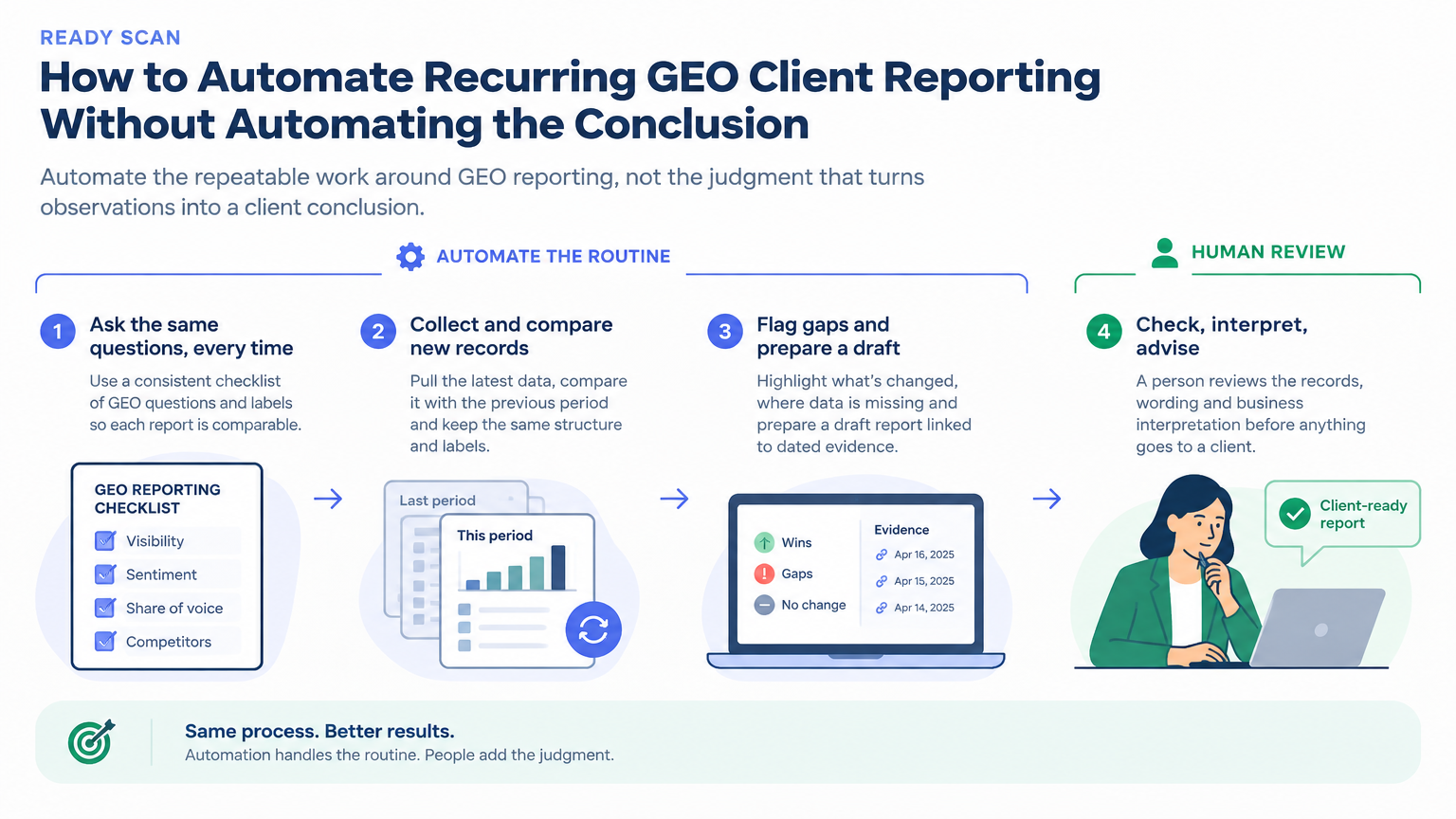
Automate the reporting routine, not the GEO verdict
Recurring client reporting often contains work that is necessary but not especially strategic: gather the latest observation records, check whether the planned questions were covered, compare this period with the previous one, identify changes and prepare a clear draft. Done manually for every account, this can consume time and make reporting inconsistent. Automated preparation can help with that repeatable work, provided the underlying records are usable and a person still owns the interpretation.
Generative engine optimization (GEO) reporting concerns how a brand or its content appears in answers from AI experiences. The observations a team has available may include saved answers, mentions, citations or other platform-specific records. A reporting automation can organize and compare those records. It cannot turn incomplete observations into certainty, establish why an answer changed, or prove that a visibility change produced a business result.
That distinction gives agencies a useful starting principle: delegate the process that creates a reviewable report, not the authority to declare what the evidence means. The goal is not an unattended client update. It is a dependable first draft that makes changes, gaps and supporting records easier to inspect.
Perplexity describes its Computer Automations as assignments that can run on a schedule or when specified events occur. Its post says an automation can use connected files, tools and Projects, retain prior work, and compare new information with earlier findings. It gives a weekly competitor-pricing comparison as an example. That describes a general recurring-work pattern, not a demonstrated GEO reporting integration or an independently verified AI visibility result. A GEO workflow using saved observation records is a practical application of the pattern, not a capability the post specifically validates for GEO data.
The distinction matters in client work. An automated summary may say that a saved answer now cites a different page. That is a useful change to investigate. It does not, by itself, establish that the brand has gained visibility across a market, that a content edit caused the change, or that more buyers have arrived. A strong report keeps the observation and the interpretation separate.
Make the records dependable before asking AI to compare them
A recurring comparison is only as useful as the records it can compare. If a question changes between periods, the platform label is missing, or a failed run is stored as though it were a completed answer, an automation may produce a polished but misleading summary. The first investment is therefore not a clever prompt. It is a small, consistent observation ledger.
For each record, retain enough context for a colleague to understand what was observed and reproduce the comparison where possible:
Client and reporting period: Make the account and observation date or period explicit.
Question and audience context: Preserve the exact buyer question, language and any relevant market or scenario. A rewritten question is a different observation, even if it sounds similar.
AI experience and settings: Identify the platform or surface, plus any settings the team considers material to interpretation.
Result and evidence: Keep the answer or relevant excerpt, citation details where available, and a reference to the dated source record.
Completion state: Distinguish a completed observation from a missing record, an error or an item that was not run.
Change context: Note relevant changes to the question set, collection approach or reporting setup so a comparison is not treated as like for like when it is not.
The ledger does not have to be elaborate. A shared working file or structured project record may be enough if it has clear labels, stable fields and a known owner. What matters is that the automation can identify which records belong to the same question and period, and can tell the difference between “no change observed” and “no new observation available.” Those are not equivalent outcomes.
Before scheduling a report, run the process on a small sample. Check whether the records are retrievable, whether dates and labels survive into the draft, and whether the automation can show which evidence supports each reported change. Fix ambiguous fields before adding more clients or questions. Consistency at the input stage is what makes period-on-period reporting useful, not a confident-sounding summary.
Design the run around a clear reporting job
Once the records are consistent, define the automation as a bounded assignment. A good brief says what to inspect, what comparison to make, what to produce and where the result should go. For example, a Monday draft could summarize changes in a client’s saved answer observations, list planned questions with no new record, and identify the dated evidence behind each reported change. It should be labelled as a draft for review, not as a finished assessment of the client’s GEO performance.
A useful instruction can set out the work in sequence:
Read the approved observation records for the stated client and period.
Match each current record to the same saved question and AI experience from the previous period.
Report only differences that are visible in the records, and distinguish them from missing or failed observations.
For each reported difference, identify the question, dates, relevant answer or citation evidence, and any uncertainty that affects the comparison.
Prepare a concise draft with a section for changes, a section for missing inputs and a section for items requiring a person’s decision.
Save the draft in the agreed working location for review. Do not distribute it to the client unless an authorised person has approved that action.
Schedules suit work that should happen at a regular cadence, such as a weekly or monthly reporting draft. An event trigger may suit a defined change in the work itself, such as a new observation record or an expected update being posted. The trigger should reflect something the team can identify reliably. If the source of a trigger is inconsistent, the automation may run at the wrong time or miss the work it is meant to catch.
A scheduled run can also check for expected inputs. For example, it can flag that a planned buyer question has no record for the period or that a client’s observation set is incomplete. This is a particularly practical use: it turns a quiet data gap into an explicit follow-up for the account team. The automation should say which input is absent and what period it expected, not fill the gap with an invented result or treat it as evidence of brand absence.
Perplexity’s post describes scheduled and event-based triggers, and says its Automations can retain prior work, flag missed updates and let users specify which actions run independently and which require review. It also describes controls for limiting connector access and actions, and the ability to inspect instructions, status, triggers and run history. These are useful design considerations for any reporting process: know what starts a run, what records it can access, what it is allowed to change, and how a reviewer can inspect what happened. The particular setup and controls depend on the tool being used.
Keep the review focused on evidence and meaning
Human review should be a defined part of the workflow, not a last-minute glance at polished prose. Give the reviewer a draft that exposes the evidence, the comparison and the open questions. That makes review faster and more useful than asking someone to judge a summary with no trace back to the underlying records.
A reviewer can work through four questions:
Is the comparison valid? Are the buyer question, AI experience, settings and observation periods sufficiently consistent for this comparison? If something changed, does the draft say so?
Does the record support the wording? Does the saved answer or citation actually show the reported change? Is the quote or excerpt long enough to preserve the meaning?
Is the interpretation appropriately bounded? Does the draft describe an observation, or does it quietly turn that observation into a claim about overall visibility, ranking, cause or customer behaviour?
Is there a useful next action? Should the team verify a missing input, inspect a cited page, investigate a reporting change or simply continue monitoring?
Consider an illustrative Monday draft: it reports that one saved answer now cites a different page than the previous record, identifies two planned questions with no new observation, and points the account lead to the dated records. The reviewer can confirm whether the records match, check whether the citation change matters to the client’s priority, and ask the team to recover the missing observations. The client-facing update should not call this an overall GEO gain or assign a cause unless other evidence supports that interpretation.
Review should also cover the destination of the output. A draft saved in an internal workspace has a different risk profile from a message sent to a client or a public channel. Start with low-impact actions: read approved records, prepare a draft and flag gaps. Keep external communication, changes to source records and other consequential actions behind explicit human approval unless the team has a clear, tested reason to permit them. Use only the access the reporting job needs, and make run history available to the people responsible for the account.
If a run produces a suspicious comparison, preserve the draft and investigate rather than silently rewriting the underlying records. A failed or incomplete run is useful operational information. Correct the record through the team’s normal process, then rerun or annotate the report so the client update reflects what was actually available.
Report visibility separately from traffic and business impact
A well-prepared report can still overstate what the records mean if its language collapses different signals into one story. A saved answer mentioning a brand, a citation to a page, a site visit and a conversion are different observations. A GEO reporting automation may summarize the first two if those records exist. It should not imply that either one proves a visit, lead or sale.
Use language that names the evidence precisely. For example: “In the saved observations for these questions, two answers cited the product page this period, compared with one in the previous period.” That describes the records. “The brand’s AI visibility improved” may imply a broader measurement than the workflow supports. “The change drove more leads” makes a business-causality claim that citation records alone cannot establish.
When client reporting includes site analytics or business metrics, show them as a separate evidence stream with their own source, period and definition. The team can compare patterns by page, topic or time window and decide what to investigate next. A movement in citations alongside a movement in visits may be worth noting, but the timing alone does not establish that one caused the other. If the client’s question is about business impact, the report should state which outcomes were measured and what relationship, if any, the available data can support.
This is not a reason to make automation timid or the report vague. It is a way to make the update more useful: identify what changed, show the records behind it, state what is missing, and recommend a proportionate next step. Sometimes that means inspecting a cited page. Sometimes it means repeating an incomplete observation. Sometimes the right call is to keep monitoring because the available evidence does not justify a content change yet.
Start with one client, one stable question set and a draft-only workflow. Review several runs for correct matching, clear evidence references and useful missing-input alerts. Adjust the record format and instructions where the process fails. Once the team can reliably inspect what the automation prepared, decide whether to extend it to more questions or accounts. The practical measure of success is not how much client communication runs without a person. It is whether the team spends less time assembling routine updates and more time making sound, evidence-led decisions with the client.
Sources
- Computer adds Automations for ongoing workPerplexity · Accessed Explore publications using this source