
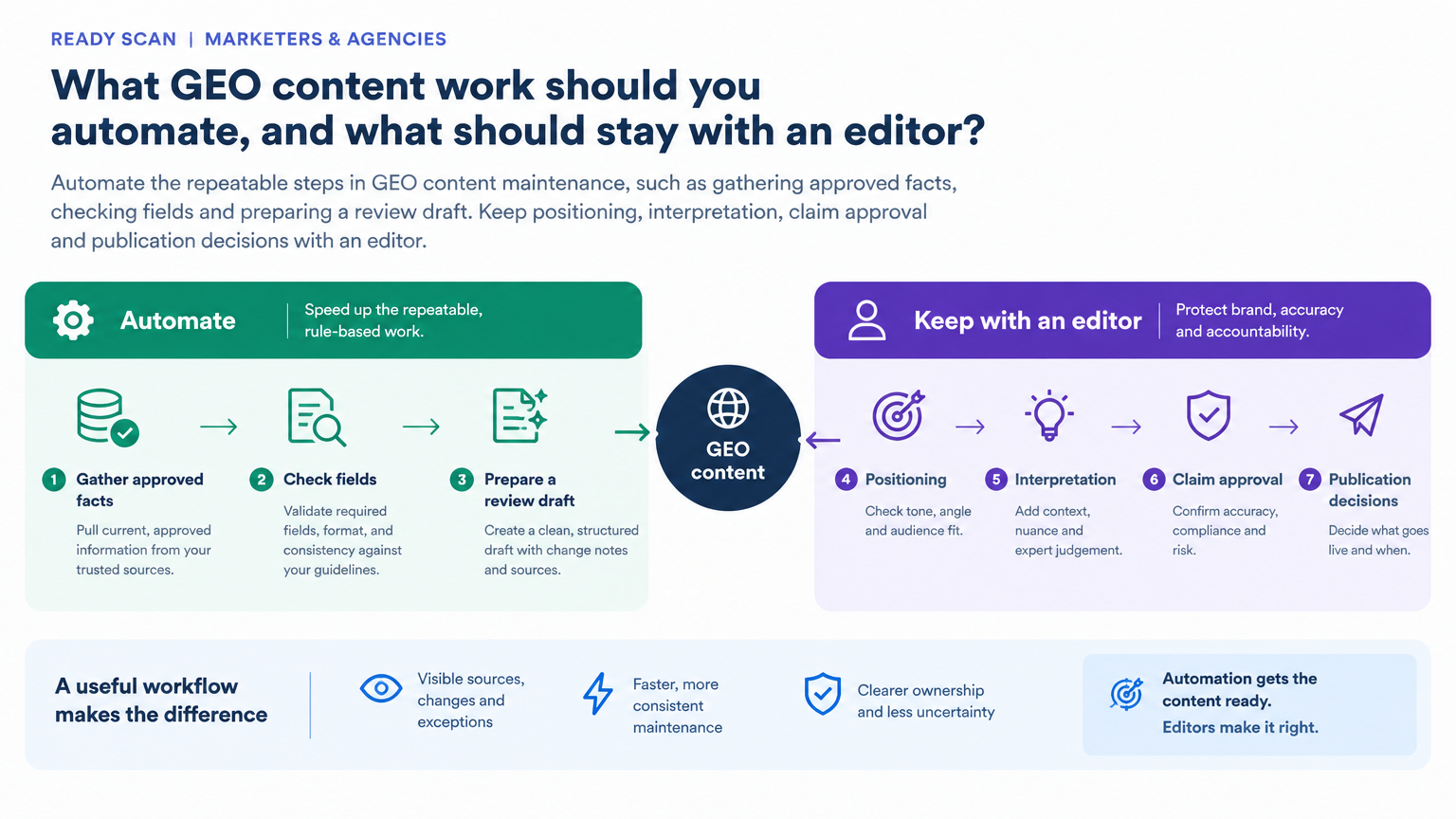
Automate the maintenance that keeps useful content usable
GEO content work can include maintaining the pages, facts and supporting evidence that help people and AI systems understand a business. Some of this work is recurring and procedural: checking that product details still match approved documentation, updating a table from a trusted data source, identifying pages due for review, or preparing a draft that shows what changed.
These are good places to look for automation because delay has a cost. A team with many pages or clients may know that details need attention but struggle to make every routine refresh fit into the week. Automating bounded steps can make the upkeep more consistent and leave marketers with more time for the decisions that make the content distinctive.
The aim is not to have AI rewrite a page because a calendar reminder fired. It is to make a repeatable job easier to complete, while ensuring the result remains accurate, useful and aligned with the current brief. A refreshed page is not automatically a better page, and an automated update does not establish a GEO visibility gain. Treat it as a maintenance workflow, not a shortcut to a performance claim.
A useful starting question is: Which recurring content task is important enough to do well, but so repetitive that it is often delayed, rushed or skipped? That points to a real operational problem. Starting with “How can we use AI?” usually creates a much broader and less actionable brief.
Use a practical test to choose what belongs in the workflow
A promising automation candidate tends to meet several conditions: it happens repeatedly, takes meaningful time, follows rules that are stable enough to explain, and produces value when done correctly. It is an even stronger candidate when the task is frequently delayed or rushed because the manual effort is hard to justify each time.
Apply the test to a specific step, not to a whole content programme. For example, “refresh our GEO content” is too broad to automate safely. “Compare the product facts in this page draft with the approved product reference, flag discrepancies and prepare a change list” is a bounded job with a clear review point.
Ask these questions before building:
How often does the task recur, and what triggers it? A monthly refresh, a new product release and a page review date are different triggers. Name the one that matters.
What makes a result correct? If two experienced editors would routinely make different calls, the rule may need clarification or the decision may belong with an editor.
What is the cost of a wrong change? Incorrect pricing, a misstated feature or an unsupported claim deserves tighter controls than a formatting adjustment.
Can the work be checked efficiently? The workflow should provide enough evidence for a person to review the result without reconstructing the entire process.
Will automating it improve the work, not just increase output? Time saved is useful when it supports more timely maintenance, stronger review or better client work, not simply a larger volume of changed pages.
A helpful first scope is often narrow: one page type, one recurring dataset, or one well-defined section of a draft. Keep work with different rules separate. A process that validates fixed product fields should not automatically inherit permission to rewrite the positioning around them.
For agency teams, check the client-specific source of truth, access permissions and approval path before reusing a workflow across accounts. Standardize repeatable preparation where it fits, but keep each client’s exceptions, positioning and publishing authority explicit.
Give the system approved inputs and rules it can actually follow
For work that depends on facts, use the automation to process trusted inputs, not to invent or discover the facts from model memory. Depending on the task, approved inputs might include current product documentation, first-party data, an agreed research source, a customer interview record, existing published content or editorial standards. Make clear which source takes precedence if inputs disagree.
This matters in GEO content because a draft may mix different kinds of information: verified business details, third-party evidence, observed AI answers and editorial interpretation. They should not be treated as interchangeable. Label the inputs so the workflow can preserve what each one represents, and have it flag conflicts, missing dates or unsupported additions rather than silently filling gaps.
Write down how the work is really done, including the exceptions that a specialist may apply without thinking. A useful process description says what to retrieve, how to check it, what may be changed, what must stay untouched and when an item needs a person. If the rule is “keep anything that looks relevant,” the system has little to follow. Translate the rule into observable criteria and examples.
Examples help make editorial boundaries concrete. Provide examples of acceptable and rejected items, explain why each decision was made, and include ambiguous cases that should be escalated. Keep rejected items with their reasons. Reviewing them can reveal that a rule is filtering out useful material or missing an exception. The rejected list is not administrative debris; it is a way to see what the workflow would otherwise make invisible.
The Ahrefs guide on automating recurring content work offers a practical model: gather source data, filter and check it, rebuild elements such as tables, prepare a draft, and leave publication for human review. It also recommends documenting the real process and its exceptions, connecting authoritative inputs, and showing accepted and rejected examples. That is a useful pattern for bounded GEO maintenance. It is not evidence that automation itself improves GEO visibility, and it does not mean an AI model should become the source of the underlying facts.
Sources: How to Automate Content Creation: A Follow-Along Guide; 10 Clearscope Alternatives (Compared on Price, API, and MCP Access); Perplexity Decider v1.3: Training, eval, and use cases
Make each run visible, reversible and reviewable
Automation can prepare evidence and flag patterns, but an editor should decide what those patterns mean for the content and the client. Keep decisions about positioning, claim approval, material changes to meaning or voice, and whether an observation merits a content change with a named person. A label such as “recommendation” is a prompt for review, not a substitute for reading the answer and checking its context.
Make the handoff explicit: identify who reviews the draft, who can approve a claim or change in positioning, and who authorizes publication. For agency work, confirm those responsibilities against each client’s approval process rather than assuming one account’s rules apply to another. If the evidence is incomplete, conflicting or consequential, have the workflow flag it for a person instead of resolving the uncertainty on its own.
Before a change goes live, the editor should be able to explain what the approved source supports, what judgment was needed and why the proposed change serves the brief. Automation can make that decision easier to prepare and inspect; it should not make the decision invisible or transfer accountability for published content.
Sources: How to Automate Content Creation: A Follow-Along Guide
Keep interpretation and editorial ownership with people
Treat the first run as a pilot, not permission to automate every page or client. Choose one recurring task and a representative output, then run the workflow from approved source retrieval through draft preparation. Inspect intermediate outputs as well as the final draft so you can locate whether a problem came from the input, a rule, a transformation or a handoff.
Compare the draft with a human-prepared version. Check factual accuracy against the approved source, whether relevant items were wrongly rejected, whether formatting fits the page, and whether any permitted rewrite preserves the intended meaning and voice. If a rule does not produce a draft an editor would approve, fix that step before expanding the workflow.
For AI classification, such as separating mentions, citations and recommendations, label a small, representative sample with an editor, including ambiguous cases. Compare the model’s labels with the reviewed sample and inspect both false positives and false negatives. If the tool provides probabilities, retain them with the labels and use the sample to choose which results need review. The threshold should reflect the relative cost of missing a meaningful recommendation and flagging an ordinary mention. Recheck the sample and threshold when the model, source or rules change.
Run the workflow several times before scheduling it. Set a failure alert, time scheduled runs to follow the refresh of their inputs, and route unusual results for review. Decide in advance what would justify expanding, adjusting or stopping the pilot. Useful measures include completed runs, missing inputs or exceptions flagged, editor corrections and review time; compare with the manual process where practical. If the workflow uses AI-answer observations, retain the exact question, AI surface and settings, observation date and answer. Report coverage separately from mentions, citations and recommendations: a missing answer is an incomplete observation, not evidence of brand absence. Page-change volume does not establish a GEO visibility gain.
Once the workflow is dependable for the selected task, add one page type or recurring task at a time. Recheck the process after changes to the model, data source, CMS or editorial rules. Expand only when the evidence and review process still support the work.
Pilot one workflow, then expand when the review proves it works
Do not start by automating every recurring update across every client or page. Pick one representative output and run the complete process from source retrieval to draft. Review the intermediate stages, not just the final prose. That makes it easier to find whether a problem came from the input, a filtering rule, a transformation or the CMS handoff.
Compare the automated draft with a version prepared by a person. Check factual accuracy against the approved source, whether relevant items were incorrectly rejected, whether the formatting fits the page, and whether any rewritten copy still reflects the intended meaning and voice. Ask the practical completion question: Would an editor approve this if the workflow had not prepared it? If not, find the failing rule or step before increasing the scope.
If an AI model classifies records, such as separating mentions, citations and recommendations, treat its labels as drafts. Create a small representative sample labelled by an editor, including ambiguous cases, then compare the model’s output and inspect both false positives and false negatives. If the tool provides probabilities, use that sample to choose when to escalate a result for review. The right threshold depends on the relative cost of missing a meaningful recommendation and flagging an ordinary mention. Keep uncertain or high-impact cases with an editor, and repeat the checks when the model, source or rules change.
Run the workflow more than once before scheduling it. Inputs change, exceptions surface and tools can behave differently after updates. Add a clear failure alert, and time scheduled runs to follow the refresh of the data they depend on. Flag unusual results for review rather than letting the workflow pass them through as routine updates. A quiet failure is particularly costly: the team may assume a page was checked when the process did not complete.
Set success criteria for the pilot before it runs. Track practical workflow measures such as completed runs, missing inputs or exceptions flagged, corrections editors need to make, and time spent reviewing the draft. Compare these with the current manual process where you can. If the workflow uses AI-answer observations, retain the exact question, AI surface and settings, observation date, and answer. Report completed coverage separately from mentions, citations and recommendations; a missing answer is an incomplete observation, not evidence of brand absence. Use the results to decide whether to expand, adjust or stop the workflow; count of pages changed is not evidence of a GEO visibility gain.
Once the pilot works reliably, expand one page type or recurring task at a time. Each new format may have different rules and exceptions. Reuse the proven parts of the workflow where appropriate, but do not assume that rules for one dataset or content format automatically fit another. Recheck the outputs after a model, data source, CMS or editorial rule changes.
The payoff is not a larger stack of auto-generated updates. It is a maintenance operation that is easier to complete, inspect and improve. Let automation take the repeatable steps off the team’s plate; keep an editor responsible for the choices that make the content worth maintaining and safe to publish.
Sources: How to Automate Content Creation: A Follow-Along Guide; 10 Clearscope Alternatives (Compared on Price, API, and MCP Access); Perplexity Decider v1.3: Training, eval, and use cases
Sources
- How to Automate Content Creation: A Follow-Along GuideAhrefs · Accessed Explore publications using this source
- 10 Clearscope Alternatives (Compared on Price, API, and MCP Access)Ahrefs · Accessed Explore publications using this source
- Perplexity Decider v1.3: Training, eval, and use casesPerplexity · Accessed Explore publications using this source