
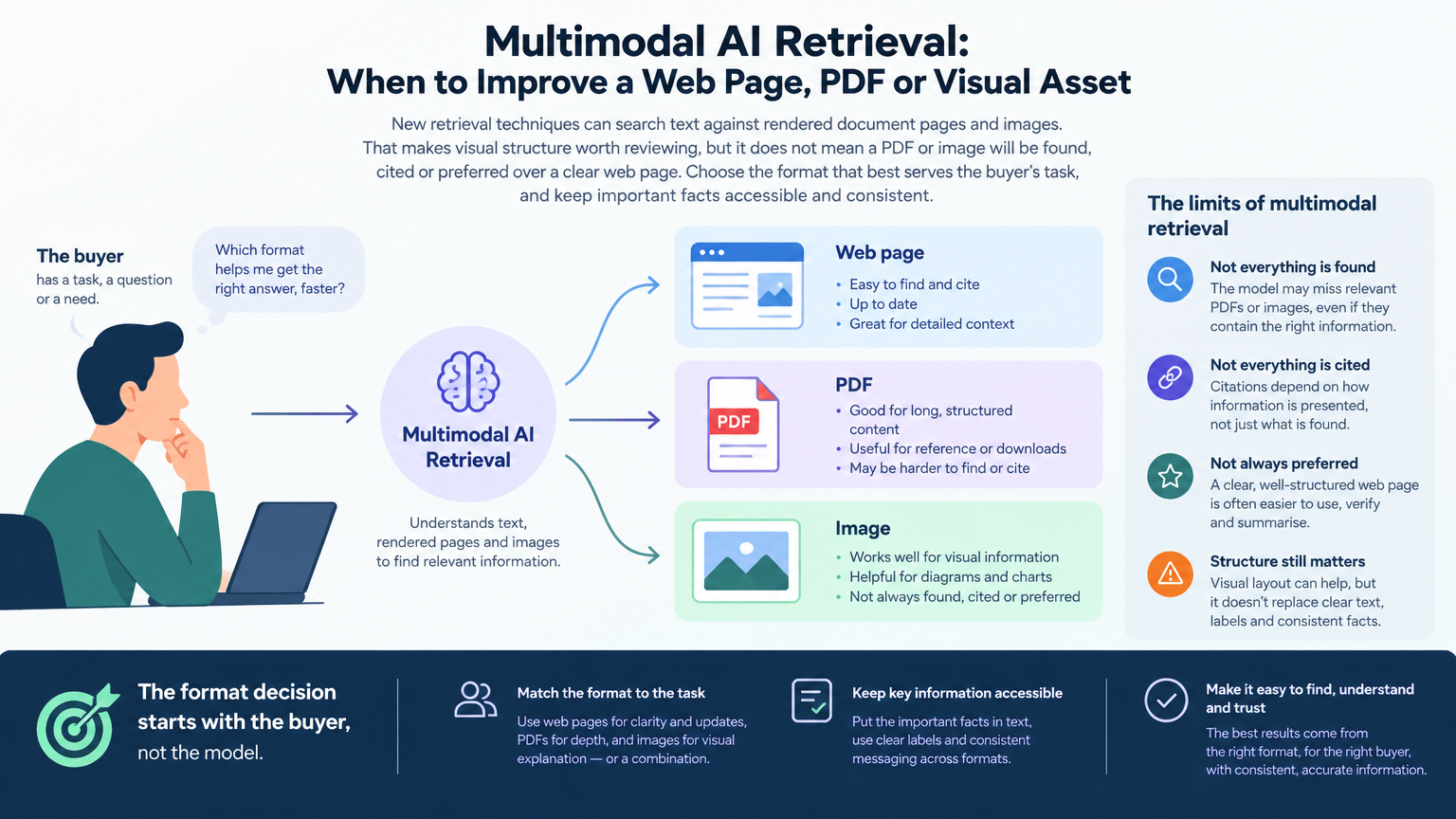
The format decision starts with the buyer, not the model
When important product or service information lives in a diagram, a dense PDF or a chart image, it is reasonable to ask whether newer AI retrieval systems can understand it. But “Can a model search this format?” is only one part of the decision. Start with the more durable question: What does a buyer need to understand, verify or do, and what is the clearest way to provide that information?
A format can make content easier to use, maintain or interpret. It is not, by itself, a visibility strategy. A useful product comparison might work best as an accessible web page with a chart embedded in it. A detailed specification may belong in a downloadable document as well as on a concise product page. A visual can explain a process quickly, while supporting text makes the meaning and conditions clear. The right answer may be more than one format, provided each has a distinct job and the facts agree.
That distinction matters for client work. A newly searchable PDF is not necessarily a better buyer experience, and an attractive infographic does not automatically answer a detailed question. Conversely, a genuinely informative diagram or structured document should not be dismissed merely because its value is not captured by plain text alone. Choose the format according to the information and the decision it supports, then make the content usable in the places your audience and systems can access.
What multimodal retrieval changes, and what it does not
Perplexity’s announcement describes a family of late-interaction embedding models that retain multiple token-level vectors instead of compressing an entire input into a single vector. In simplified terms, a query can contain several meaningful parts, and different parts can match different parts of a document. The system’s comparison is therefore more fine-grained than a single whole-document similarity score.
The announcement also describes support for text-to-image retrieval and searching rendered PDF pages directly, without first requiring OCR or parsed text. That capability matters because a rendered page can carry meaning through more than its words. A table’s row and column relationships, a chart’s labels and plotted values, the proximity of a note to a figure, or the order of steps in a process diagram can all contribute to interpretation. A conventional conversion into plain text may not preserve every such relationship.
For marketers, the practical implication is modest but useful: do not assume that information communicated visually is invisible to every retrieval approach. If a meaningful answer exists only in the visual arrangement of a document, it is worth checking whether the visual is clear, legible and correctly labelled. At the same time, a model’s ability to process rendered pages does not establish that it is used in every search product, that a particular document is indexed, or that its content will appear in an AI answer. It certainly does not guarantee a citation or recommendation.
The announcement reports model capabilities and benchmark evaluations. Those describe the models and evaluations discussed there, not a universal change in consumer search behavior or the architecture of every AI answer system. Treat this as a reason to review content quality across formats, not as a forecast of a visibility lift or a brief to move important information out of HTML.
Diagnose the information gap before choosing a format
Start with the buyer question and the point where the current content fails to help. Is the answer missing, hard to locate, difficult to verify, or genuinely dependent on visual relationships? Those are different problems and call for different fixes.
A practical review can begin with four checks:
What must the reader do? Find a specification, compare options, understand a process, confirm eligibility, or take an action?
Where is the reliable answer now? Identify the canonical page or document, and check whether its information is accurate, current and complete enough for that task.
What is lost in the current presentation? Is the problem missing explanation, vague copy, a hard-to-read table, a chart without labels, or a document whose structure is difficult to follow?
What should the reader do next? If the answer affects a purchase, service decision or operational step, make the relevant next action and its conditions clear.
Then match the work to the gap. If an essential fact is missing, add it to the appropriate canonical page. If the fact is present but buried, improve the page structure and wording. If a table or diagram carries important comparisons or relationships, make that visual clearer and explain its key meaning in text. If a PDF is the right detailed reference, improve the document and provide a clear route to it from the relevant web page. If the information is already clear and useful, avoid inventing a format project simply to respond to a new AI capability.
The decision is not a contest between HTML and visual content. It is a question of which presentation makes the answer accurate, understandable, maintainable and actionable for its intended audience.
Give each format a clear job
A web page is often the strongest canonical home for information buyers need to verify, compare or act on. It can be updated, organized around a user’s question, linked to related details and made accessible through the site’s navigation. Keep essential facts in clear text, with headings that describe the decision or topic rather than relying on a visual alone. Where a chart adds meaning, include it in context and explain what the reader should take from it.
A PDF can be the right format for a substantial reference, a printable guide, a technical specification or a document whose page layout is part of its meaning. Make the file easy to identify and use: give it a descriptive title, use a logical reading order, make tables and labels legible, and keep its facts aligned with the corresponding web page. A PDF should not become the only place where a buyer can find a critical current fact if a straightforward web explanation would serve them better. Provide an accessible page that summarizes the answer and points to the full document when needed.
A chart, diagram or image earns its place when visual form clarifies something that would be cumbersome or less understandable in prose: a process, a comparison, a spatial relationship, a product detail or a change over time. Give it a descriptive title and labels. Explain the takeaway, relevant conditions and source of important figures in nearby text. Do not make colour the sole way to distinguish categories, and do not place essential caveats where they are hard to associate with the visual.
These choices can be combined. For example, a service page could state the offer and its limits, include a diagram that explains the workflow, and link to a detailed PDF for implementation requirements. The page serves as the easy-to-check explanation; the diagram makes a relationship visible; the document supplies depth for readers who need it. The important discipline is to keep claims and details consistent across all three.
Use a format decision to scope the work, not promise a result
For each high-priority piece of information, record the buyer question, the current destination, the specific gap and the change you propose. Then name a completion condition that someone can actually check. For example: the product page states which plan includes a feature and any relevant limits; the chart distinguishes the options and explains its labels; or the PDF’s key tables are readable and match the current page.
Assign an owner for the underlying facts, especially when pricing, specifications, availability or service terms change. When the same information appears in a page, a PDF and a visual, decide which source controls the fact and who updates the other versions. This prevents a polished new asset from introducing a contradiction that weakens trust and creates extra client work.
Review the result on two tracks. First, assess the content itself: can a buyer find and understand the answer, verify the relevant detail and take the intended next step? Second, if the team is monitoring AI search or answer surfaces, retain the exact question and full response, note the system and observation context, and distinguish a mention from a citation or recommendation. A different retrieval capability may make some visual material available to a search process; it does not show that a particular change caused a particular answer.
Do not treat a citation as proof of a visit, lead or sale. Evaluate traffic and business outcomes with the analytics and CRM measures appropriate to the campaign. If visibility changes, describe what was observed and avoid attributing causation unless the evidence supports it. The commercially useful deliverable is a better-supported answer to a buyer need, a maintainable content source and a clear next review, not a guaranteed placement in AI answers.
The practical decision is straightforward: improve the web page when buyers need a clear, current answer; improve the PDF when the document is the right detailed reference and its structure matters; improve the visual when it communicates a meaningful relationship more clearly than text alone. Combine formats when each adds distinct value, and keep the canonical facts accessible and consistent. Multimodal retrieval is a reason to take visual information seriously, not a reason to abandon human-first content or manufacture an AI-format project.
Sources
- Multimodal embeddings beyond a single vectorPerplexity · Accessed Explore publications using this source